I’ve blogged about my favorite phone of all time, the Palm PVG100, before:
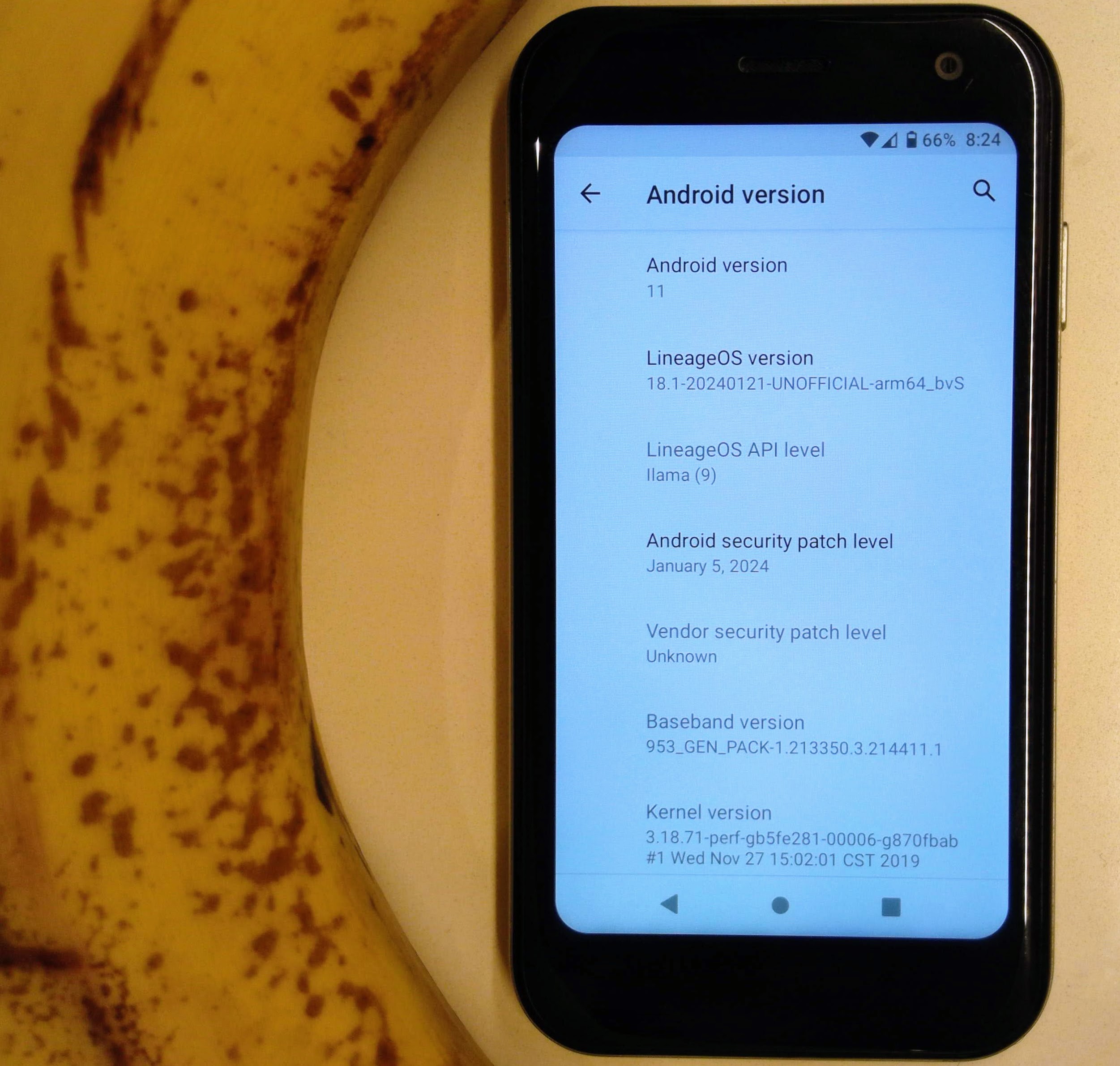
And while I successfully upgraded it to Android 11, that still is pretty old (and with the stock kernel). The phone came out in 2018 with Android 8.1. Android 11 came out in 2020.
I just love this phone so much. I wondered, what would it take to upgrade this thing to the latest Android 16 (2026)?
The Linux Kernel Comes First
I knew that one of the first blockers was going to be getting a new kernel running.
This has never been done before on a PVG100. And generally (per the xdaforums) it was considered impossible.
But sometimes the lines are blurry between what is actually impossible, what is very difficult, and what is unknown.
Here were some open questions:
- Is the PVG100’s bootloader unlocked: Confirmed Yes
- Will the PVG100 boot unsigned kernels: Yes (previously unknown)
- Will the PVG100 boot modern kernels and talk to the Qualcomm’s TrustZone correctly?: Yes (we never got that far before)
- Will a kernel from 2026 even work with a phone from 2018 built to run on linux 3.19?: Yes! (previously very difficult)
Picking a Kernel
You gotta start with what works. Thanks to the GPL, Palm open-sourced the original kernel and uploaded it to SourceForge and I mirrored it here and here. This is extremely valuable. Sure, the reference is super old, but it works. For each peripheral on the ARM device tree, we have a working example describing exactly what pins it uses, where the clock comes from, or what memory locations are reserved. For future kernels, we’ll need to port that data forward, and use new symbols.
My first guess at a good next kernel to pick was the msm-4.9 kernel, here.
I thought this was a safe choice.
Still an msm fork, which was designed to run on this SoC.
Not super far in the future, but still more advanced than the stock 3.19 kernel.
This was a good bet. I learned a TON about how the toolchain works, what it looks like to debug something on this hardware, yet keeping the userspace (Android 8.1) the same. So kinda changing one thing at a time.
It worked! I didn’t get all peripherals up, but I did get Android 8.1 booted on 4.9. I’m sorry I didn’t save a screenshot.
But, this was a stepping stone to my ultimate goal: Android 16.
For that, I decided to go ever further in the future and use the Lineage-maintained fork for the msm8937 platform, located here.
For Android 16 (LineageOS 23.2), this is kernel version 4.19 with lots of backports.
So sure, getting some source code is a great start. And I know how to compile and flash it. But how do I actually make it work on this hardware?
Getting Serial Console Access
You need serial console access for any embedded development work, otherwise you are flying blind.
I couldn’t find any prior art for getting serial console access on this device.
I used a razor and opened up the back, probed for points and used picocom and a multimeter.
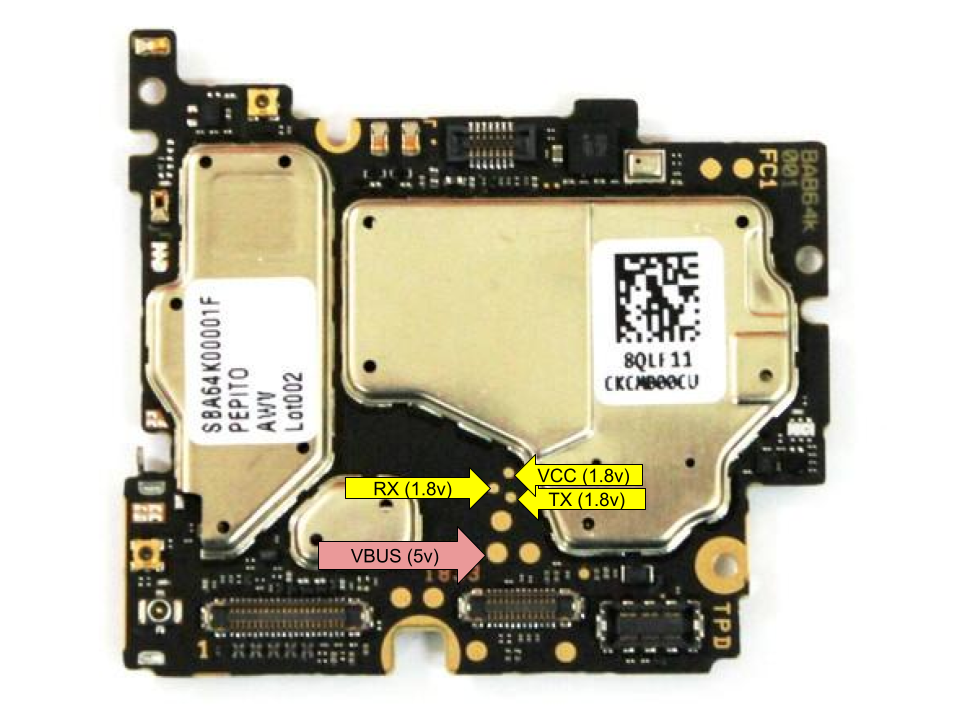
Warning: These are 1.8v TTL lines!
You can use a standard 3.3v adapter to receive, but don’t send 3.3V out to this thing.
Here is my crappy soldering:
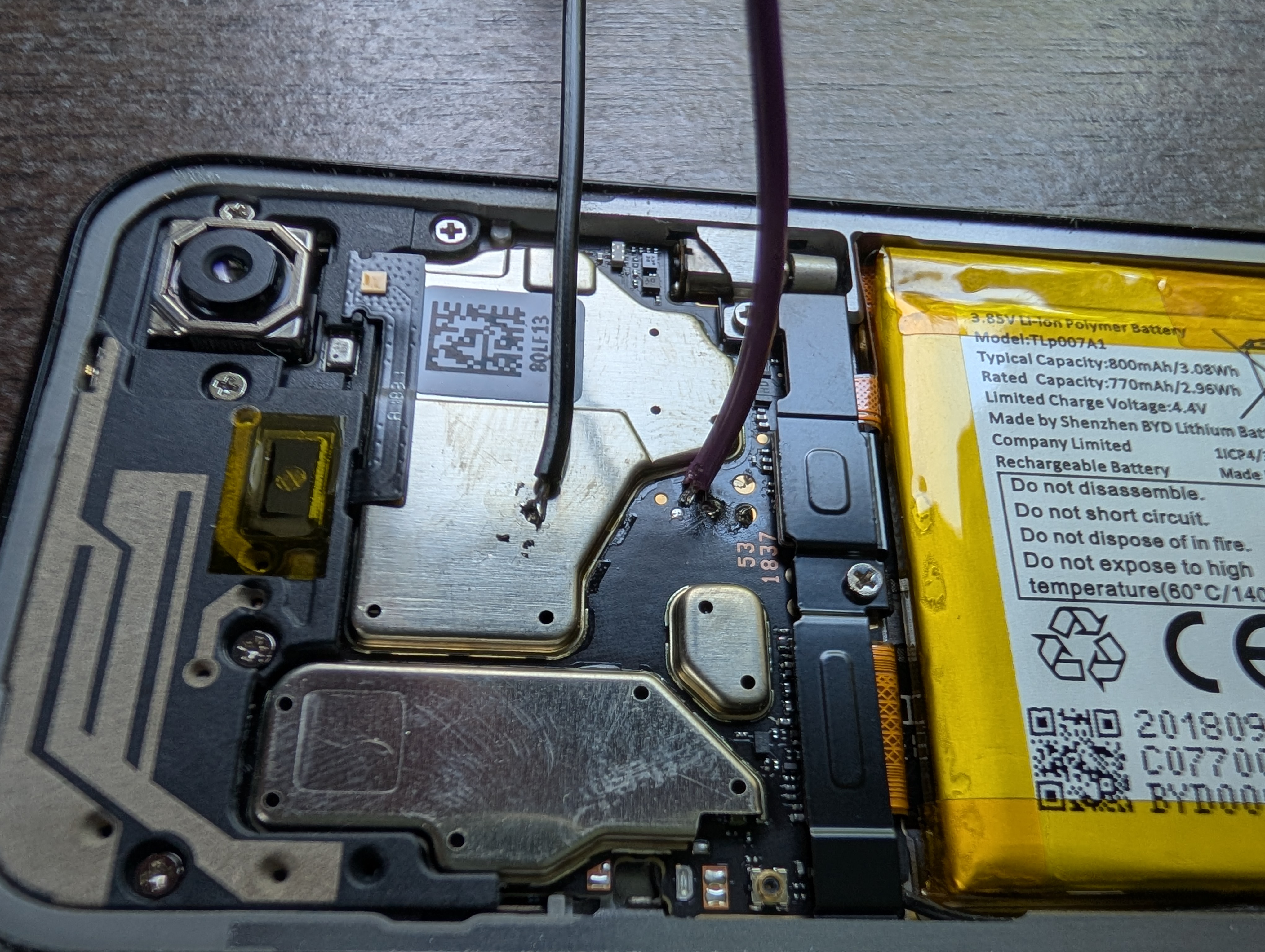
It is overkill. You only need 1 wire: TX. If USB is plugged in, then your computer is already the ground.
I believe the pinout is this:
Fighting Device Trees
Most of this work is getting the perfectly working device tree.
Unlike x86 servers, the device tree for mobile devices like this is extremely detailed.
It prescribes every piece of hardware, every low-level hardware bus, literally every pin.
Every CPU is described. The voltage on the backlight is specified. Blocks of RAM carved out for modem firmware are in there.
For example, here is the entry for the phone’s battery:
/* Default/demo battery profile for Palm PVG100 (Pepito).
 * Used when BMS cannot identify the installed battery by ID resistor.
 * Source: stock pepito.dts qcom,tcl_demo_800mah_pepito8940 node.
 */
qcom,byd-default-pepito {
        qcom,default-battery-type;
        qcom,max-voltage-uv = <4400000>;
        qcom,nom-batt-capacity-mah = <800>;
        qcom,batt-id-kohm = <18>;
        qcom,battery-beta = <3435>;
        qcom,thermal-coefficients = [c2 86 bb 50 cf 37];
        qcom,fastchg-current-ma = <700>;
        qcom,battery-type = "byd";
        qcom,fg-cc-cv-threshold-mv = <4390>;
        qcom,chg-rslow-comp-c1 = <5276595>;
        qcom,chg-rslow-comp-c2 = <12419180>;
        qcom,chg-rs-to-rslow = <1986597>;
        qcom,chg-rslow-comp-thr = <0xC9>;
        qcom,checksum = <0xB88A>;
        qcom,gui-version = "PMI8950GUI - 2.0.0.16";
        qcom,fg-profile-data = [
                C5 83 24 77
                B0 7B 41 74
                5B 83 75 6C
                A1 88 58 94
                42 82 9A 98
                62 B6 EF C1
                52 0F F7 83
                06 7D E2 80
                3B 76 4E 83
                5A 70 12 71
                3B 85 37 82
                2A 9A 66 BD
                5F CA 58 0C
                1C 03 09 62
                14 70 63 FF
                03 35 80 3C
                5E 34 00 00
                D9 45 5D 30
                1D 36 00 00
                00 00 00 00
                00 00 00 00
                F2 71 73 71
                47 7F BF 5F
                9F 6E 84 60
                6D 60 96 72
                4A 6C F9 43
                D4 5C EC A1
                2C FF 70 B6
                6E A0 71 0C
                28 00 FF 36
                F0 11 30 03
                00 00 00 0C
        ];
};
Porting this device tree to 4.19 was NOT easy, but the reference original GPL 3.19 kernel and the original device tree that is included in the actual Palm boot.bin serve as a reference for everything.
I wouldn’t say it is mechanical, but generally the work here was (and continues to be) porting the devices over into the modern device tree format, and then upgrading them to use modern device driver references.
It is painful and I’m still working on getting everything right, but it does boot!
Fighting Serial
Just getting serial going was hard.
First, just getting the exact kernel boot parameters to see anything took time.
It ended up being:
console=ttyMSM0,115200,n8 androidboot.console=ttyMSM0 earlycon=msm_serial_dm,0x78b0000
But then, I fought this mysterious halt of output after some i2c bringup.
It turned out that the actual serial tty itself was being re-initialized (incorrectly). It took me forever to even realize that the lack of console output was the very thing I was troubleshooting.
But you know what helped me figure that out, ramoops.
Ramoops
The linux kernel has a mechanism called Ramoops that will save kernel logs to a circular buffer.
I was aware of this feature, but I had never tried to use it till now.
This is incredibly useful when bringing up a device that might reset at any moment.
After a crash, on the next boot, the kernel will notice the ramoops content and print it for you.
For example let’s say you are fighting on getting the right i2c clock setup and you see this on the serial:
[   27.328797] calling  clock_late_init+0x0/0x17c @ 1
[   27.335748]
(phone resets)
Well gosh, sure would be nice to know what the kernel was trying to say on its last dying breath! What happened at 27.335748!!!
Well with ramoops, on the next boot this will show up:
[    0.984103] calling  pepito_dump_prev_ramoops_console+0x0/0x1e0 @ 1
[    0.990216] prev-ramoops: sig=0x43474244 start=314359 size=314359 capacity=2097140
[    0.996750] prev-ramoops: ====== BEGIN previous boot console ======
[    1.003946] prev: [    0.000000] Booting Linux on physical CPU 0x0000000100 [0x410fd034]
....
[   36.186849] prev: [   27.328797] calling  clock_late_init+0x0/0x17c @ 1
[   36.195279] prev: [   27.335748] clock_late_init: Removing enables held for handed-off clocks
[   36.201690] prev-ramoops: ====== END previous boot console ======
How useful is that!
Of course, if you keep rebooting your prev: will start cascading:
[ 36.195279] prev: [ 27.335748] prev: [ 1.003946] prev: [ 0.000000]
So uh, fix the clock! :)
Magic Sysrq
Another great debugging tool that Linux has is the “magic SysRq key”.
If enabled, you can dump all sorts of great data on a stuck kernel. I’ve used this tons of times in my professional career on normal servers.
I needed to do three things to take advantage of this on my tiny phone:
- Enable it in the kernel and kernel boot options of course
- Add
sleep()in key parts of the kernel boot where I needed some time to press the right keys, before the phone reset itself - Figure out how to send the “sysrq” key through serial?
On picocom you press ctrl-a to escape, then ctrl+\ to send a BREAK, then press a sysrq command key, like h for help.
But honestly I never got this to actually work on my Palm.
I think I fried it.
Booting For Real
If you are watching the serial output on this thing, here is what the initial bootloader to kernel handoff looks like:
Format: Log Type - Time(microsec) - Message - Optional Info
Log Type: B - Since Boot(Power On Reset),  D - Delta,  S - Statistic
S - QC_IMAGE_VERSION_STRING=BOOT.BF.3.3-00228
S - IMAGE_VARIANT_STRING=FAASANAZA
S - OEM_IMAGE_VERSION_STRING=WS241
S - Boot Config, 0x000000e1
B -       249 - PBL, Start
B -      2955 - bootable_media_detect_entry, Start
B -    259917 - bootable_media_detect_success, Start
B -    259922 - elf_loader_entry, Start
B -    261563 - auth_hash_seg_entry, Start
B -    275588 - auth_hash_seg_exit, Start
B -    304536 - elf_segs_hash_verify_entry, Start
B -    404205 - PBL, End
B -    414312 - SBL1, Start
B -    468236 - pm_device_init, Start
B -    471682 - PON REASON:PM0:0x8000020020 PM1:0x200020020
D -     26138 - pm_device_init, Delta
B -    496326 - boot_flash_init, Start
D -         0 - boot_flash_init, Delta
B -    498644 - boot_config_data_table_init, Start
D -      4880 - boot_config_data_table_init, Delta - (0 Bytes)
B -    508618 - CDT version:3,Platform ID:8,Major ID:1,Minor ID:0,Subtype:170
B -    515694 - sbl1_ddr_set_params, Start
B -    519964 - cpr_init, Start
D -      3995 - cpr_init, Delta
B -    526247 - Pre_DDR_clock_init, Start
D -       305 - Pre_DDR_clock_init, Delta
D -         0 - sbl1_ddr_set_params, Delta
B -    538172 - do ddr sanity test, Start
D -       305 - do ddr sanity test, Delta
B -    543845 - pm_driver_init, Start
B -    550891 - Manually set to USB500 mode
B -    551104 - raw vbat: 4485, gain: -21
B -    554917 - vbat: 4249
B -    557265 - tct:enter vbatt_weak_status vbat_adc=4249;bootup_threshold=0

B -    564250 - Battery good, bootup
D -     20252 - pm_driver_init, Delta
B -    570807 - vsense_init, Start
D -        30 - vsense_init, Delta
B -    577548 - DDR Training restore, Start
D -       274 - DDR Training restore, Delta
B -    592706 - clock_init, Start
D -       274 - clock_init, Delta
B -    593072 - Power-on reason: 0x20  PON1 (secondary PMIC),
B -    597952 - Power-off reason: 0x80  KPDPWR_N
B -    602314 - PON_WARM_RESET_REASON: 0x2  PS_HOLD
B -    606919 - PON_SOFT_RESET_REASON: 0x0
B -    610854 - TCT_PON_PON_REASON1=0X20

B -    614575 - before usd id check usb_id=1

B -    620583 - Image Load, Start
D -     86590 - QSEE Image Loaded, Delta - (1543940 Bytes)
B -    707203 - Image Load, Start
D -       335 - SEC Image Loaded, Delta - (2048 Bytes)
B -    714401 - enter:get gpio for board id
B -    717848 - the board id is boardnum=5
B -    721660 - Pepito: PIO2
B -    724283 - hw id=0x6b0e1, 0xd060006b

B -    728157 - sbl1_efs_handle_cookies, Start
D -       671 - sbl1_efs_handle_cookies, Delta
B -    736422 - Image Load, Start
D -     14030 - DEVCFG Image Loaded, Delta - (56148 Bytes)
B -    751093 - Image Load, Start
D -     21533 - RPM Image Loaded, Delta - (180264 Bytes)
B -    772961 - STinfo:Boot1 locked permanently
B -    776377 - STinfo efuse=1,boot1=127

B -    779305 - Image Load, Start
D -     39925 - APPSBL Image Loaded, Delta - (590312 Bytes)
B -    819260 - QSEE Execution, Start
D -       122 - QSEE Execution, Delta
B -    825025 - USB D+ check, Start
D -       732 - USB D+ check, Delta
B -    831369 - SBL1, End
D -    419405 - SBL1, Delta
S - Flash Throughput, 28000 KB/s  (2376104 Bytes,  84136 us)
S - DDR Frequency, 921 MHz
S - Core 0 Frequency, 800 MHz
Android Bootloader - UART_DM Initialized!!!
[40] Qseecom Init Done in Appsbl version is 0x1000000
[40] secure app region addr=0x84a00000 size=0x1900000[40] TZ App region notif returned with status:0 addr:84a00000 size:26214400
[50] Qseecom TZ Init Done in Appsbl
[70] Loading cmnlib done
[100] Not able to search the panel:
[350] fb_size = 2764800, fb_display->width = 720, fb_display->height = 1280, fb_display->bpp/8 = 3
[350] lk battery voltage reading from sbl is 4249
[360] LK:battery voltage is 4249 V > 3550 mV(BOOT_UP_THRESHOLD)
[360] show uboot logo,then bootup
[750] logo_decompress = 0
[970] read misc=
[970] misc not match
[980] check power key long pressed in secs
[980] key long pressed is broken!
[980] power key is NOT held
[990] read misc=
[990] misc not match
[990] reboot mode:0xb63339bf
[1220] boot_verifier: Signature decrypt failed! Signature invalid = -1
[1430] key long pressed is broken!
[1480] key long pressed is broken!
[1530] key long pressed is broken!
[1580] key long pressed is broken!
[1630] key long pressed is broken!
[1680] key long pressed is broken!
[1730] key long pressed is broken!
[1780] key long pressed is broken!
[1830] key long pressed is broken!
[1880] key long pressed is broken!
[1930] key long pressed is broken!
[1980] key long pressed is broken!
[2030] key long pressed is broken!
[2080] key long pressed is broken!
[2130] key long pressed is broken!
[2180] key long pressed is broken!
[2230] key long pressed is broken!
[2280] key long pressed is broken!
[2330] key long pressed is broken!
[2380] key long pressed is broken!
[2430] key long pressed is broken!
[2480] key long pressed is broken!
[2530] key long pressed is broken!
[2580] key long pressed is broken!
[2630] key long pressed is broken!
[2680] key long pressed is broken!
[2730] key long pressed is broken!
[2780] key long pressed is broken!
[2830] key long pressed is broken!
[2880] key long pressed is broken!
[2930] key long pressed is broken!
[2980] key long pressed is broken!
[3030] key long pressed is broken!
[3080] key long pressed is broken!
[3130] key long pressed is broken!
[3180] key long pressed is broken!
[3230] key long pressed is broken!
[3280] key long pressed is broken!
[3330] key long pressed is broken!
[3380] key long pressed is broken!
[3430] key long pressed is broken!
[3480] key long pressed is broken!
[3530] key long pressed is broken!
[3580] key long pressed is broken!
[3630] key long pressed is broken!
[3680] key long pressed is broken!
[3730] key long pressed is broken!
[3780] key long pressed is broken!
[3830] key long pressed is broken!
[3880] key long pressed is broken!
[3930] key long pressed is broken!
[3980] key long pressed is broken!
[4030] key long pressed is broken!
[4080] key long pressed is broken!
[4130] key long pressed is broken!
[4180] key long pressed is broken!
[4230] key long pressed is broken!
[4280] key long pressed is broken!
[4330] key long pressed is broken!
[4380] key long pressed is broken!
[4430] key long pressed is broken!
[4480] key long pressed is broken!
[4530] key long pressed is broken!
[4580] key long pressed is broken!
[4630] key long pressed is broken!
[4680] key long pressed is broken!
[4730] key long pressed is broken!
[4780] key long pressed is broken!
[4830] key long pressed is broken!
[4880] key long pressed is broken!
[4930] key long pressed is broken!
[4980] key long pressed is broken!
[5030] key long pressed is broken!
[5080] key long pressed is broken!
[5130] key long pressed is broken!
[5180] key long pressed is broken!
[5230] key long pressed is broken!
[5280] key long pressed is broken!
[5330] key long pressed is broken!
[5380] key long pressed is broken!
[5430] key long pressed is broken!
[5480] key long pressed is broken!
[5530] key long pressed is broken!
[5580] key long pressed is broken!
[5630] key long pressed is broken!
[5680] key long pressed is broken!
[5730] key long pressed is broken!
[5780] key long pressed is broken!
[5830] key long pressed is broken!
[5880] key long pressed is broken!
[5930] key long pressed is broken!
[5980] key long pressed is broken!
[6030] key long pressed is broken!
[6080] key long pressed is broken!
[6130] key long pressed is broken!
[6180] key long pressed is broken!
[6230] key long pressed is broken!
[6280] key long pressed is broken!
[6330] key long pressed is broken!
[6380] key long pressed is broken!
[6430] key long pressed is broken!
[6480] key long pressed is broken!
[6510] fb_size = 2764800, fb_display->width = 720, fb_display->height = 1280, fb_display->bpp/8 = 3
[6520] lk battery voltage reading from sbl is 4249
[6520] LK:battery voltage is 4249 V > 3550 mV(BOOT_UP_THRESHOLD)
[6530] show uboot logo,then bootup
[6920] logo_decompress = 0
[7910] uart_enable= uart_enable=1
[7930] Qseecom De-Init Done in Appsbl
[7930] Channel alloc freed
[    0.000000] Booting Linux on physical CPU 0x0000000100 [0x410fd034]
[    0.000000] Linux version 4.19.325-cip132-st16-perf-g126e1a5063b5-dirty (Android (14054515, +pgo, +bolt, +lto, +mlgo, based on r563880c) clang version 21.0.0 (https://android.googlesource.com/toolchain/llvm-project 5e96669f06077099aa41290cdb4c5e6fa0f59349), LLD 21.0.0 (/mnt/disks/build-disk/src/googleplex-android/llvm-r563880-release/out/llvm-project/llvm 5e96669f06077099aa41290cdb4c5e6fa0f59349)) #25 SMP PREEMPT Thu Jun 4 11:26:37 PDT 2026
[    0.000000] Machine model: Qualcomm Technologies, Inc. MSM8940-PMI8950 Palm PVG100
...
Conclusion
It really does boot!
Seems almost anticlimactic to see a bunch of console text, but just seeing the string Linux version 4.19 on the console output represents a lot of time and effort.
Now, getting a kernel booting correctly is one thing.
Getting everything about the device working, really the whole OS, is quite another.
That will be the next big hurdle: moving past kernel space and into userspace, and fixing all the bindings between them.
Stay tuned for that, where I’ll publish my kernel tree for getting this old phone on a modern kernel!
Comment via email