Previously I wrote about getting a new version of the Linux kernel booting on my favorite phone of all time, the Palm PVG100 (pepito).
This blog post is about my (enormous) effort of porting Lineage 23.2 (Android 16) to the phone, running version 4.19 of the Linux Kernel.
Did you stumble onto this post just because you own a Palm PVG100, and you’re not into all this techno mumbo jumbo?
I’ll flash Android 16 onto your phone for you for cool $100. Email me at kyle@cascade.family for details.
This was easily 100x the effort of my original work of getting LineageOS 18.1 (Android 11) on it.
For reference, this phone originally came with Android 8.1.
Why Me? Why This Phone?
I’m able to do this port now for a couple of unique reasons:
-
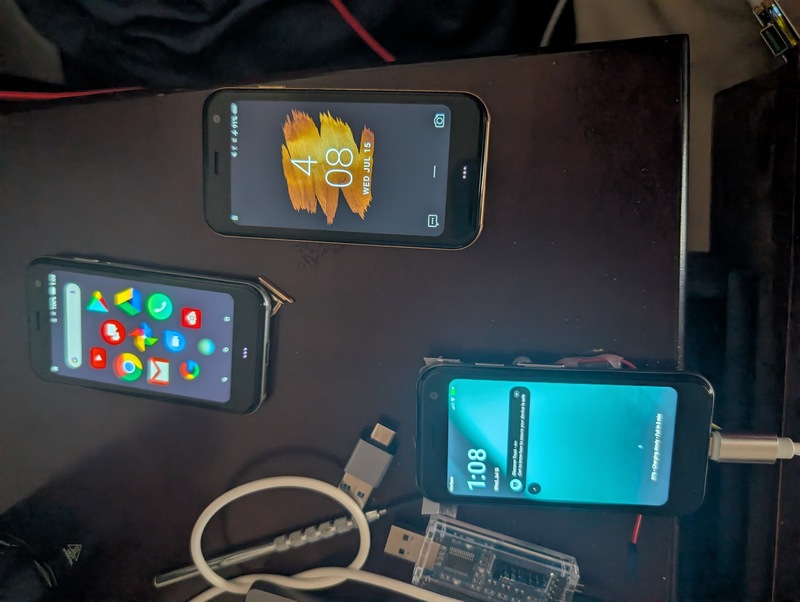
I have 3 copies of this phone (don’t ask). This gives me the ability to “diff” how the phone works live across Android 8 (stock), Android 11 (my previous build), and Android 16 (WIP).
-
I’m on paternity leave. I don’t exactly have a lot of free time, but I do have key moments of downtime which are perfect for babysitting AI
-
The PVG100 uses EDL for flashing. Combined with a full flash backup, make this phone UNBRICKABLE. I have a huge safety net for developing this.
-
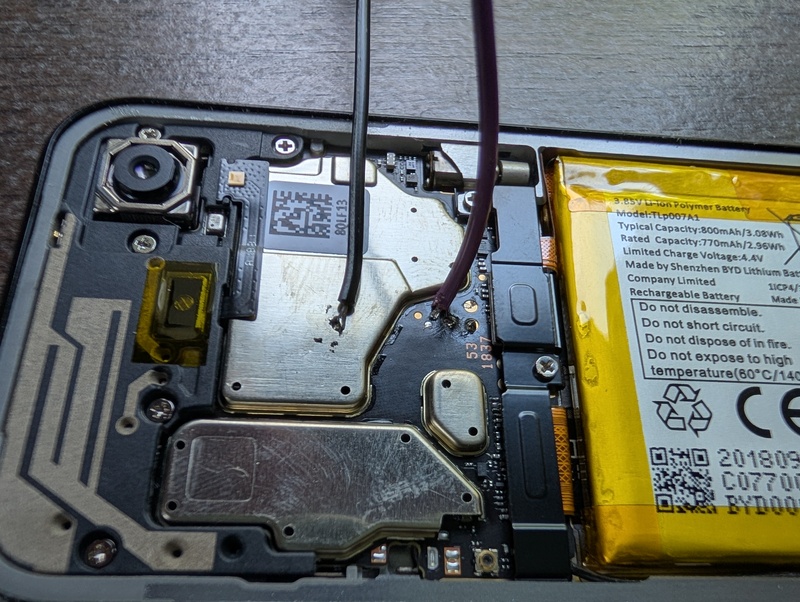
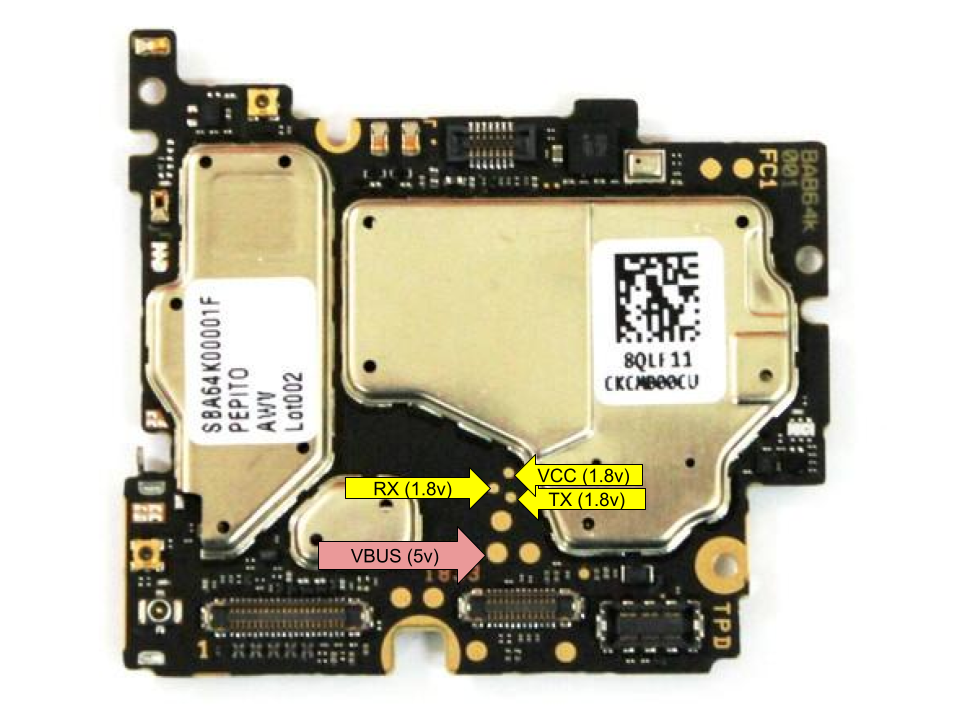
This phone has serial port pads exposed, and I have the soldering skills to use them. This port would not be possible without them. Blank screens, boot loops, etc, they are all solvable problems when you have serial access.
-
AI help is real now, in July 2026, and good enough to help me complete this port.
-
I’m fortunate enough to be in a position to throw some cash at this problem and have fun while I’m at it!
Getting AI Help
I can compile a kernel and debug an embedded Linux device, but I actually don’t know much about Android internals.
This project is going to require a ton of AI help.
I used Claude Code professionally, so for this hobby project I wanted to experiment with other AI tools and providers to see what else is out there.
Also, I wanted to be cost-sensitive.
This is a hobby project, there is no monetary ROI. I’ll be generous, but not unbounded.
I want to be able to use this phone again, but I also just want to learn and experience what this is like.
For me, I would like to keep it under $500. This will keep it under the “ask the wife first” limit. It was, the final bill was about ~$250.
AI Help: Tools Used
For this project I used:
- Qwen 3.6 35B with Charm
- OpenAI’s Codex with max thought
- Anthropic’s Opus 4.8 (and later Fable) with Claude Code
- Z.AI’s GLM 5.2 with Charm
My review:
- Local LLMs were useless for this problem. It isn’t a self-contained coding challenge. It is a “why is the touch screen not working” thing. Local LLMs just got stuck in tool usage doom loops and reading context over and over.
- GLM 5.2… just couldn’t keep the details straight. It would read the original PLAN.md instructions, but just kinda lost track of what it was doing when it came to the hardcore debugging. In the end I gave up on it, and only used it for very straightforward coding problems.
- Codex did only an OK job, but struggled on the hard parts.
- When I ran out of my 3-seat Codex subscription and switched to Claude Code + Opus, that is when things really started to get fixed.
- I had to use Fable to get the really hard stuff working (telephony, hardware encryption)
Overall, I gave other tools a try, but came back to Claude Code. It really did the best job for this particular project. The $100 for Pro 5x met my usage habits, and Fable was an extremely valuable AI partner in this project. Money well spent.
Glossary
A quick reference for acronyms and terms used throughout this post. Skip this and come back if something confuses you.
- AOSP: Android Open Source Project. The base Android code everything (including LineageOS) builds on.
- LineageOS: a popular open-source Android distribution built on AOSP. The ROM this port is based on.
- ROM: in this context, a full custom Android build/firmware image, not the read-only memory kind.
- HAL: Hardware Abstraction Layer. The piece of code that lets Android talk to a specific chip without caring about its exact silicon.
- Vendor blob: a precompiled, closed-source binary (driver, library, firmware) shipped by the phone/chip vendor that Android relies on.
- Source-built: the opposite of a blob: compiled from source we have, rather than a precompiled binary we can’t inspect or fix.
- DTS / DTB: Device Tree Source / Device Tree Blob. The file format the kernel uses to describe what hardware exists on a board and how it’s wired up.
- HIDL / AIDL: HAL Interface Description Language / Android Interface Description Language. Two generations of the plumbing Android uses for processes to talk to hardware services. AIDL is newer.
- QMI: Qualcomm MSM Interface. Qualcomm’s internal RPC protocol used heavily by the modem, Wi-Fi, and GPS stacks.
- SELinux Enforcing / Permissive: SELinux is the kernel security policy layer. Permissive just logs violations; Enforcing actually blocks them. Shipping software should run Enforcing.
- FBE: File-Based Encryption. Android’s per-file disk encryption scheme.
- TEE: Trusted Execution Environment. An isolated secure processor/mode used for cryptographic keys and secure boot.
- RPMB: Replay Protected Memory Block. A small tamper-resistant storage region on the eMMC/UFS chip used for secure counters and keys.
- Keymaster / Gatekeeper: Android’s hardware-backed cryptographic key storage (Keymaster) and lock-screen credential verification (Gatekeeper) services.
- VoLTE / IMS: Voice over LTE / IP Multimedia Subsystem. The standard that carries phone calls as data over LTE instead of a legacy circuit-switched connection.
- RIL: Radio Interface Layer. The Android layer that talks to the cellular modem.
- EDL: Emergency Download Mode. A low-level Qualcomm recovery mode baked into the chip itself, used to unbrick a device even when nothing else boots.
- WCNSS / Pronto: the Qualcomm subsystem name for the combined Wi-Fi/Bluetooth radio silicon on this chip.
- DUT: Device Under Test. Whichever physical phone is currently being worked on.
- Qualcomm: the chipmaker behind the phone’s SoC, modem, and Wi-Fi/Bluetooth radio. Most of the low-level vendor code in this port traces back to them.
- Xiaomi: the phone maker whose MSM8937/8940 devices share the same Qualcomm silicon as this Palm phone, so their LineageOS device trees became the base this port builds on.
- pepito: the internal codename for the Palm PVG100, this phone.
- HCI: Host Controller Interface. The standard protocol layer that talks to a Bluetooth radio chip; the “HCI HAL” is the Android service implementing this on top of the actual hardware transport.
- GSI: Generic System Image, a stock unmodified Android system image meant to boot on any compliant device via Project Treble. Used earlier in this bring-up as a compatibility test layer, distinct from the fully custom device-specific ROM built later.
- Adreno: Qualcomm’s GPU brand.
This phone uses an Adreno 505; its driver stack (kernel
kgsldriver plus closed-source userspace blobs) needed several rounds of blob and microcode fixes to get the display working. - ACDB: Audio Calibration Database, Qualcomm’s per-device DSP tuning data (volume curves, echo cancellation, voice quality). Needs a loader library to parse and apply it; on this phone that loader was simply never shipped, so every boot silently ran without any calibration at all.
Bringup Details
Recording for posterity, here is a summary of all the work required to get this thing running on Android 16. You can skip this section if you are not interested in technical details.
If you are interested in technical details, here is a TON!
And if you want even MORE, you can check out the index repo with all the PLAN files on exactly what I did, and all the forks that I have to make this port work.
Generally, here was my philosophy in building this:
- Don’t fork a new device tree. Xiaomi ships several phones on the same Qualcomm chip (MSM8937/8940) as this Palm phone, and LineageOS already has a unified device tree for that whole family. Add pepito as one more runtime-detected variant of that existing tree instead of maintaining a whole separate one.
- Source-build every HAL instead of relying on Xiaomi’s precompiled blobs. This phone shipped on Android 8.1. Xiaomi’s blobs for this chip are built against super old, incompatible library versions. Rather than fight that mismatch, compile the audio, camera, and Bluetooth stacks from source against the current Android 16 tree.
- Look at the working stock hardware instead of guessing how it is supposed to work I kept three physical copies of this phone side by side: one on stock Android 8.1, one on my earlier Android 11 GSI build, and the Android 16 build being actively worked on. Whenever a subsystem broke, the question was never “how should this work in theory,” it was “how does this exact phone already do it on stock”, checked live, on real hardware.
- Keep a running PLAN file per subsystem Camera, audio, sensors, radio, and so on each got their own tracking document recording current status, root causes found, and next steps. This turned out to matter more than expected once AI got involved, more on that below.
Kernel, Device Tree, and Boot Image
In the previous post, I detail all the work that went into even getting the thing to boot in the first place with a new kernel.
It took me a long time to figure out the exact procedure for building a (self) signed boot image that the PVG100 would actually boot.
The bootloader isn’t running stock AVB. It implements an older AVBv1-style scheme: a DER-encoded signature block appended right after the raw boot image, verified against a certificate baked into the bootloader itself.
Getting a signature the bootloader would actually accept meant reverse-engineering the exact byte layout by hand: the SHA1 image ID field, a stock os_version value the bootloader silently expects, and a hand-built ASN.1 SEQUENCE containing the certificate, an algorithm identifier, the signed attributes (target partition name and image size), and a 256-byte RSA-PKCS1v15-SHA256 signature over the image plus those attributes.
The OID inside claims SHA1, but the bootloader doesn’t actually check it, the real hash is SHA256!
I was dumbfounded but AI really helped here to be 100% sure this was true.
If any future ROM author needs it, here is the script that writes out a boot image the PVG100 accepts.
Vendor Blob Extraction
Android from a vendor is an unholy amalgamation of three things:
- Good old open source code (AOSP).
- The vendor’s own open source contributions (for us, the Palm GPL dump).
- The vendor’s closed source contributions, in the form of “vendor blobs.”
A lot of this port comes down to figuring out which blobs are actually needed. Do we pick the old ones from stock Android 8, the newer ones sitting in a Xiaomi nightly’s vendor image, or something wackier?
Most of the time, the go-to source for a missing blob was a Xiaomi nightly’s vendor image, mounted read-only.
From there, readelf walked out each blob’s full dependency chain by hand.
You usually can’t get away with pulling just one blob; each one tends to need a few more you didn’t know about yet.
The goal was to use only the blobs actually necessary for functionality. Picking too many is bad: they’re built for an old version of Android and cause their own headaches. We need just the right amount of old vendor blobs to make the phone work, no more.
Display & Touchscreen
Two separate problems here: getting anything to draw on screen at all, and getting the touch digitizer recognized.
Display.
The GPU driver was loading, but SurfaceFlinger kept aborting on startup.
Root cause was missing Adreno GPU blobs (libadreno_utils.so, then a second round for the LLVM shader compiler libs) that never made it into the vendor blob extraction.
Once those were pulled from a vendor dump of a Xiaomi device on the same GPU, the screen came up.
Touchscreen. The controller is a FocalTech FT8613, an “in-cell” chip fused into the display panel itself. The kernel tree shipped two different FocalTech drivers, and the wrong one was active by default, a variant that assumes an older chip with a different boot-ID handshake. Switching to the correct in-cell-aware driver, teaching it about the FT8613’s chip ID, and adding the missing pin state got touch working end to end.
Wi-Fi
The phone’s Wi-Fi chip is a Qualcomm Pronto/WCNSS part, same silicon family used across the Xiaomi devices this port is based on. So the firmware and drivers were already in reasonably good shape from the shared tree.
- Firmware location.
The Wi-Fi firmware blobs (
wcnss.mdt, etc) needed to be found on the right partition. Also needed the right ueventd rule pointing at them so the kernel’s firmware loader could find them. - QMI vs. direct NV loading. The stock Xiaomi config path pulls Wi-Fi calibration/MAC data over QMI. Pepito doesn’t need that indirection since the calibration file already lives on the persist partition. Switched it to load directly off the file instead.
- The actual failure, once the driver got that far:
wpa_supplicantwas failing to start. Its config file didn’t exist yet on a freshly flashed device. A one-line init fix to seed that file at first boot did it.
Bluetooth
Bluetooth ended up entirely source-built, none of the proprietary Qualcomm Bluetooth blobs were actually needed.
The AOSP HIDL Bluetooth HAL plus the source-built Qualcomm CAF vendor library turned out to be enough.
Three real bugs stood between “off” and “on”:
- No HCI HAL was in the image at all. The framework tried the new AIDL interface, didn’t find it, fell back to the older HIDL interface, found the manifest entry but no service binary behind it, and gave up. Fix: package the source-built HIDL service instead of the never-materializing proprietary one.
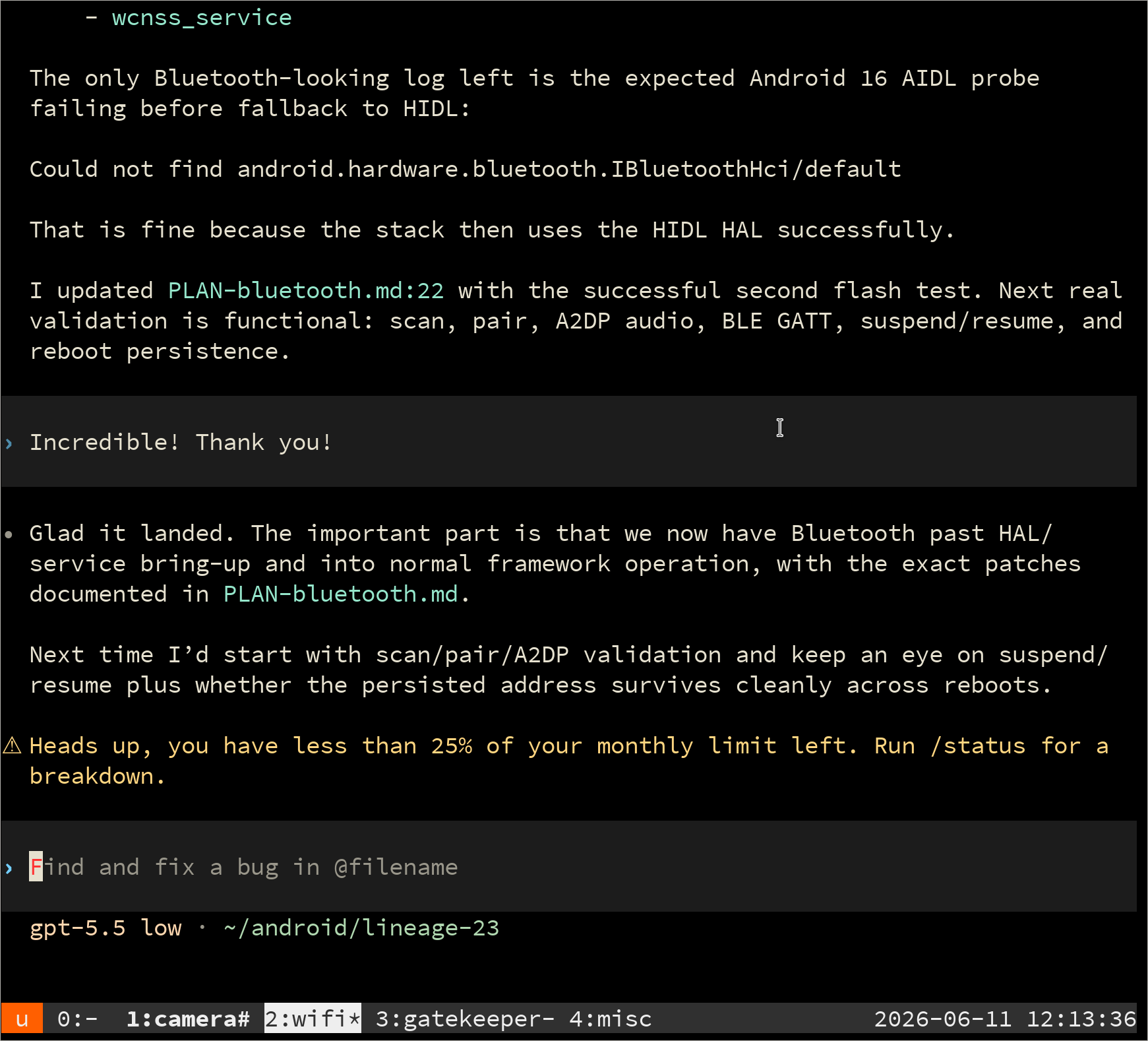
- No Bluetooth MAC address. The vendor library aborted looking for one. Stock Palm firmware stores a raw binary MAC on the persist partition; taught the HAL to read that format.
- The power-on path assumed hardware that isn’t there. The vendor library expected a legacy serial-attach helper program that doesn’t exist on this kernel. Bluetooth’s radio (Pronto) is shared silicon with Wi-Fi and is already powered on by the kernel, so I made the “power on” call a no-op that just reports success. A related low-level ioctl call on the transport channel was also failing (harmless) and needed to be downgraded from fatal to a warning.
Audio
Audio on Android is hard. There are a couple of parts that all need to work for sounds to actually come out of your speakers:
- The kernel driver for the actual amplifier chip driving the speaker or earpiece.
- The audio HAL, the service that bridges Android’s audio framework to the actual hardware.
- A config file (
audio_platform_info.xml) mapping logical audio devices to physical DSP backend IDs. - A DSP mixer graph (
mixer_paths.xml) wiring which digital path connects to which physical output. - Calibration data (ACDB) tuning volume curves, echo cancellation, and voice quality for this specific phone’s hardware.
Every one of these turned out to be broken or missing in its own way.
Speaker was completely silent, and every software signal said it was working. Volume was up, the PCM stream was running, the codec’s internal amplifier showed on and driving current. The actual amplifier chip was somewhere else entirely. This phone doesn’t drive its speaker off the internal codec at all; it routes through an external NXP smart-amp chip that was simply missing from the build. Once that chip’s kernel driver and device tree node were brought up, the speaker made sound for the first time.
Calls connected, but there was no audio in either direction. The DSP mixer graph, the piece of config that says which digital path connects to which physical output, was still routing voice audio to the wrong internal backend, a dead one for this phone’s hardware. Stock firmware routes voice through the same external amp backend the speaker uses. Comparing how the stock phone did it was the key part to figuring this out. Separately, the earpiece output needed a specific hardware control that didn’t exist in the open kernel driver source and had to be reconstructed by comparing against the closed stock driver binary. AI helped a ton here.
The audio_platform_info.xml config file was silently never loading.
The audio HAL looks for a specific filename depending on which codec variant it detects, and ours was shipping the file under the generic name instead of the variant-specific one it actually checks for.
That file controls which internal ID numbers map to which audio path, so every call silently opened the wrong device ID and instantly failed, while music playback never noticed because it takes a different code path.
Renaming one file fixed in-call audio.
It is just one of those things you don’t actually test until late in the bring up.
Who makes phone calls anymore these days? :)
Calibration data (ACDB, the DSP’s tuning profiles for volume curves, echo cancellation, and voice quality) simply never loaded. The library responsible for parsing and loading it was listed in the build’s blob manifest but had never actually been copied into the tree, so every boot silently failed to open a library that didn’t exist and fell back to uncalibrated defaults.
Sensors
This phone has 20 hardware sensors, split across two completely separate sets that both had to be brought up independently.
Set one: 4 sensors (proximity + ambient light) talk to the modem-adjacent DSP over QMI, the same IPC mechanism behind a lot of the radio pain later in this post.
The DSP-side firmware runs an older sensor framework than its newer siblings, and it needs a small per-phone config file telling it which physical sensors exist.
That file, sensor_def_qcomdev.conf, simply didn’t exist for this phone yet, so the DSP came up with zero sensors registered.
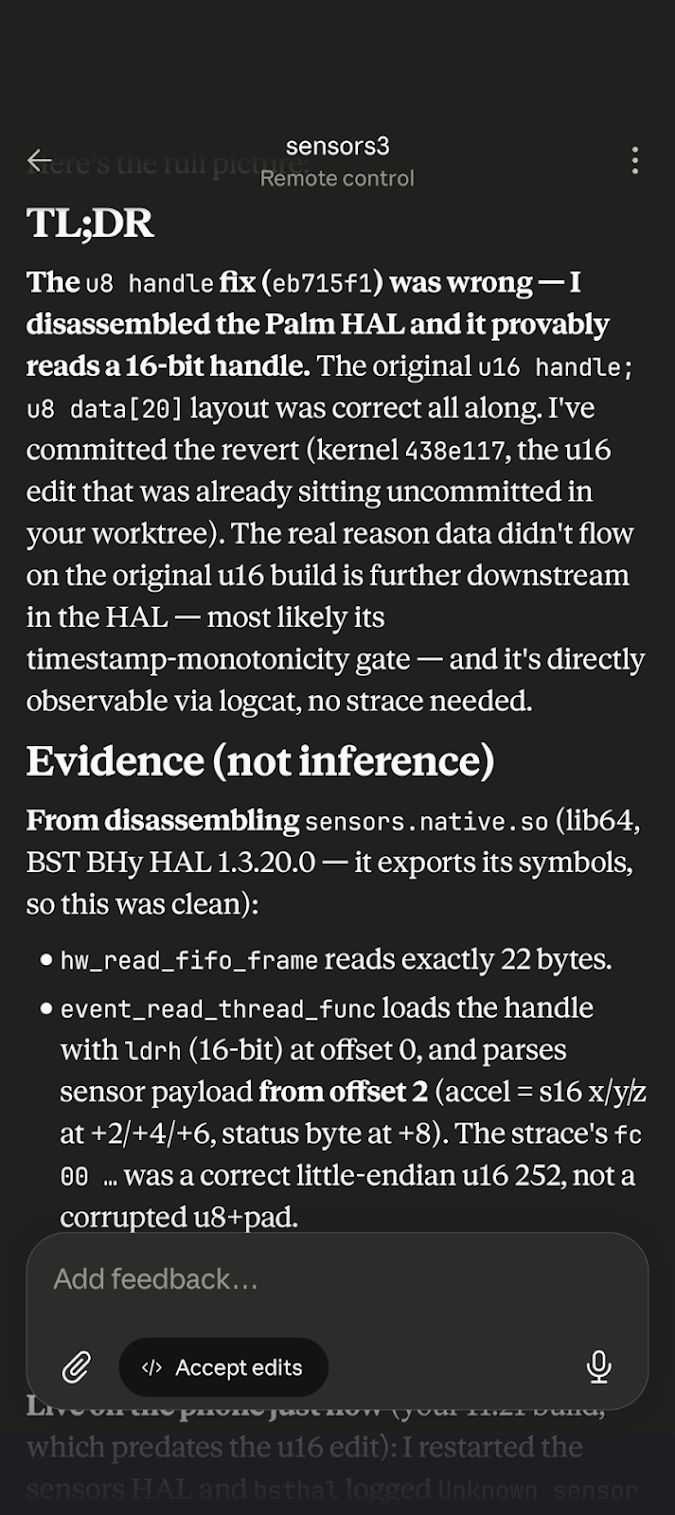
Set two: the other 16 sensors (accelerometer, gyro, compass, pressure, and their fused outputs) run through a separate Bosch BHI160B sensor hub with its own tiny firmware blob. There was no usable driver for the sensor chip (BHI160B) anywhere. It was not in our 4.19 kernel tree, NOT in Palm’s public GPL source dump! The kernel’s built-in driver, which only knows the plain BMI160 (this chip’s non-hub sibling), doesn’t speak the BHI160B’s actual protocol at all. The fix was porting in Bosch’s own published open-source driver for this hub and forward-porting it to this kernel version. Once it was in and building, three separate bugs in that ported driver had to be found and fixed: a data-size mismatch, a firmware-reset race condition, and a wake-channel event the driver wasn’t handling. All three had to be fixed before the hub would deliver live data instead of just enumerating sensors that never produced values.
Cameras
Cameras on Android have even more moving parts than audio. A short list of what has to line up before a photo comes out:
- The kernel sensor driver, talking the actual register protocol of the specific camera chip.
- Per-sensor factory calibration data (color tuning tables, one-time OTP calibration) loaded correctly at init.
- A session/device ID matching scheme so the framework’s request for “camera 0” reaches the right physical sensor pipeline.
- The ISP daemon, the closed-source process that actually drives the image signal processor between the sensor and the framework.
- A camera HAL, the service bridging Android’s camera framework to that daemon, agreeing with the daemon on buffer formats and stream types.
- Various small helper libraries the camera stack dlopens on every camera open, expecting them to exist.
- A framework-level flag telling Android which generation of camera API this device actually supports.
Cameras stayed dead for a long stretch, hidden behind a chain of five separate bugs where each one only became visible once the previous one was fixed.
Bug 1: the rear and front cameras were fighting over the same internal ID. The kernel assigns each camera a session number used to match the camera framework’s request to the right hardware pipeline, and the code computing that number produced the same value for both cameras by coincidence in testing, then broke outright for the front camera. Fixed by computing it the same way stock firmware does, from the actual registered video device number, not a hand-rolled formula.
Bug 2: the sensor’s saved factory calibration data couldn’t be read at all. Palm’s camera stack sends the phone a special, non-standard command during startup to pull one-time calibration data off the sensor, and the generic kernel driver had no idea what that command meant, so it errored out immediately. Adding a case to just accept it fixed sensor init.
Bug 3 and 4 were both missing vendor files: the per-sensor color/tuning tables for both camera modules, and a small performance-hint helper library the camera stack calls into on every open. The second one is interesting: a stock version of that helper existed but used an old API that no longer exists in modern Android, so loading it just crashed the camera process. The fix was writing a tiny do-nothing stand-in with the same function names so the calls resolve to something harmless instead of nothing at all.
Bug 5: a config flag was pointing at the wrong property name, so the modern camera framework thought this phone only supported the old, deprecated camera API and refused to use it at all.
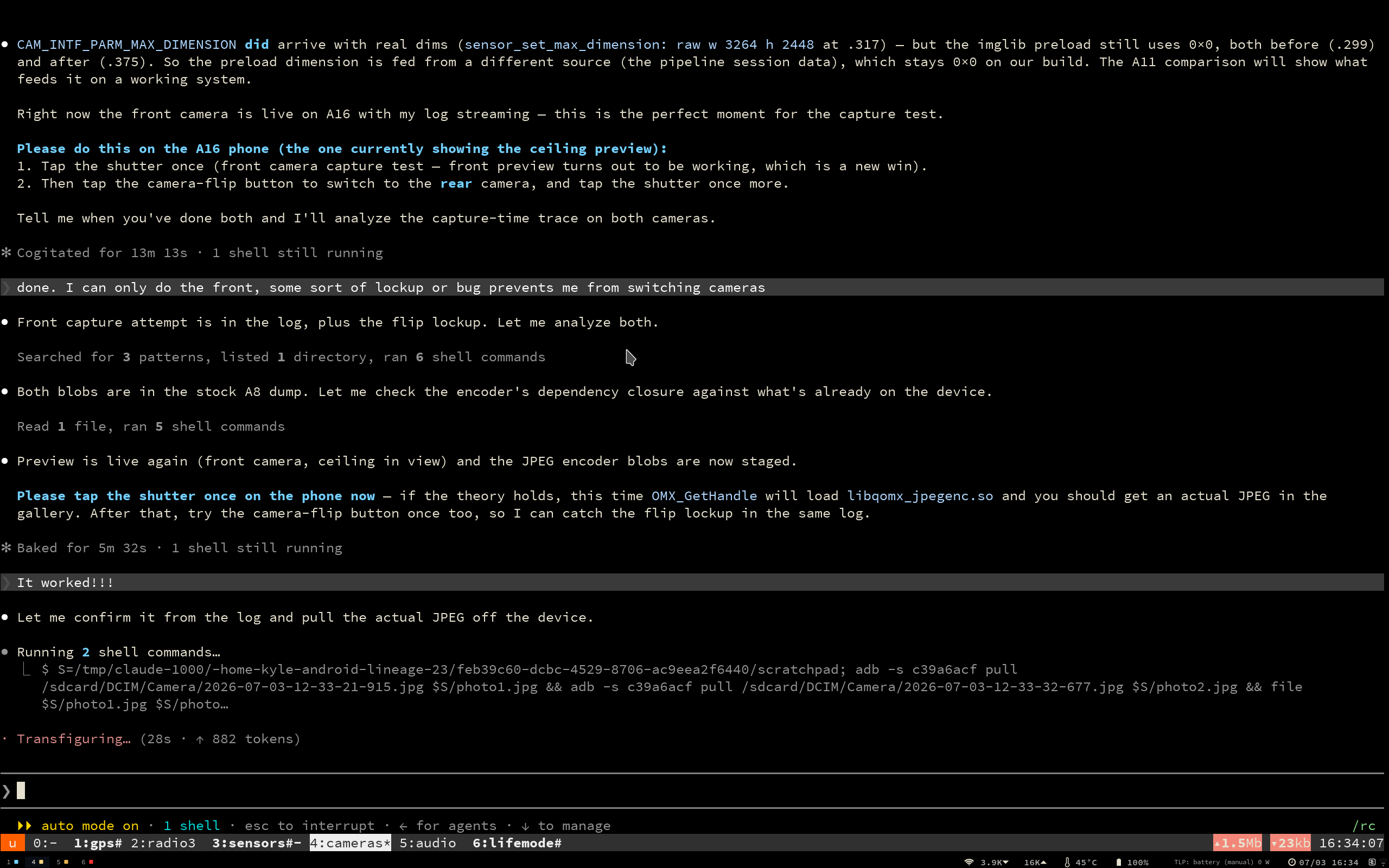
With all five fixed, both cameras enumerated, but actually taking a photo or streaming a preview hit two more bugs layered on top: buffer format handling between the framework and the old camera daemon was passing garbage sizes across that boundary (fixed by switching to a fully source-built camera HAL instead of the closed-source stock one), and a phantom, malformed “analysis” stream that the sensor’s calibration data was reporting at zero-by-zero resolution, quietly poisoning the whole capture pipeline until it was explicitly ignored. End state: both cameras deliver live preview and capture real photos.
Hardware Encryption (Keymaster, Gatekeeper, FBE)
First, some more terms:
- The TEE (Trusted Execution Environment), a secure enclave running on the same CPU that the normal OS can’t peek into. On this chip it’s Qualcomm’s QSEE.
- Keymaster, the service that asks the TEE to create and use cryptographic keys the main OS never sees in the clear.
- Gatekeeper, which turns your PIN/pattern into a TEE-verified token that unlocks those keys.
- RPMB (Replay Protected Memory Block), a small tamper-resistant area on the eMMC chip where the TEE stores its secure counters. Keymaster and Gatekeeper are useless without working RPMB writes.
- FBE (File-Based Encryption), the actual per-file encryption of
/data, keyed off all of the above.
None of it worked, and for a long time I was chasing the wrong layer.
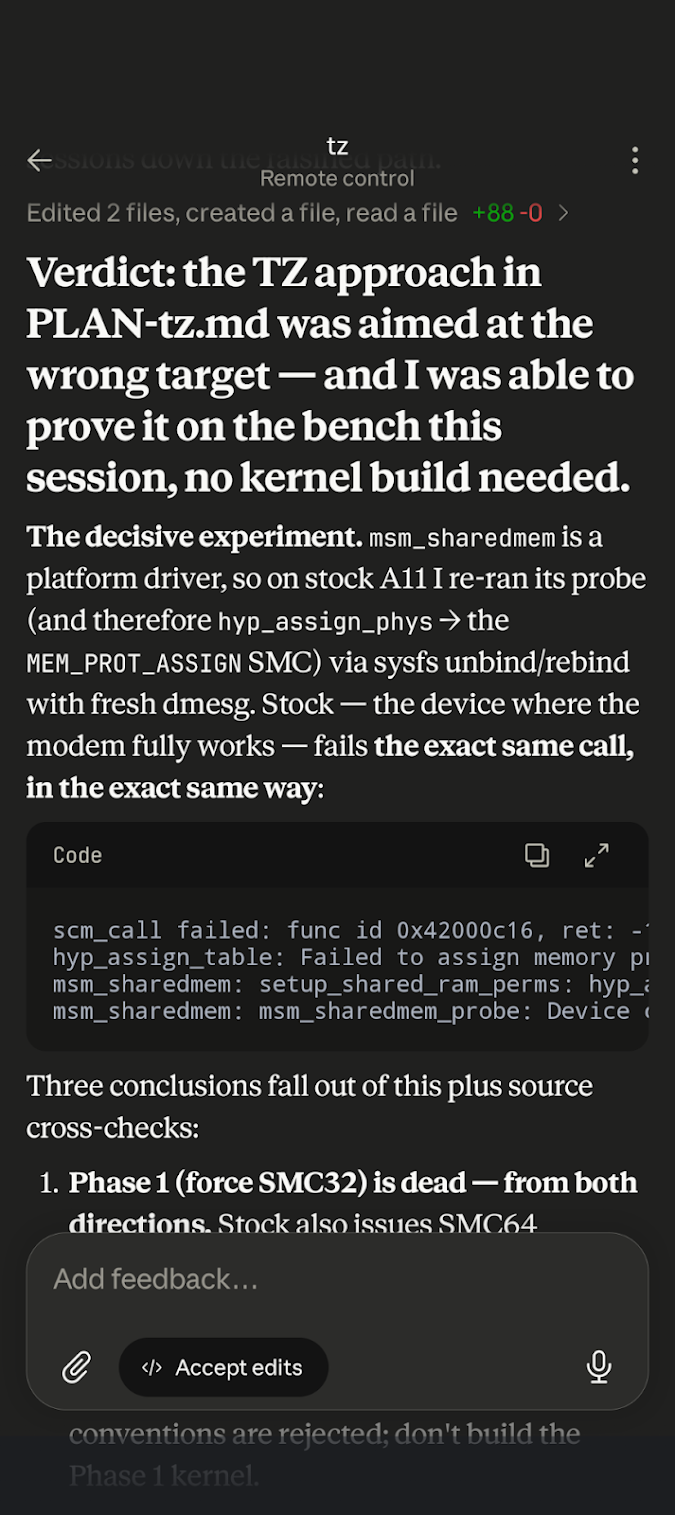
The TrustZone red herring.
My early theory was that something fundamental about how the new 4.19 kernel talked to the secure world was broken, since every secure operation seemed to fail.
The boot log was full of scary-looking TrustZone rejections: hyp_assign_phys failing, MEM_PROT_ASSIGN SMC calls returning errors.
I burned a couple of sessions on this before proving it was a dead end, using a trick that fit the “look at the working stock phone” theme perfectly: on the stock Android 8 phone you can unbind and rebind a kernel driver over sysfs, which re-runs all its startup hardware calls and prints fresh logs, no kernel rebuild required.
Doing that on stock showed the exact same TrustZone rejections, on a phone whose encryption works fine.
Palm’s TrustZone simply doesn’t implement that call family!
The kernel just spells the resulting error code differently on 4.19 than on 3.18.
The real bug: every secure storage write was silently corrupted.
With TrustZone cleared, the failures all traced to one thing: every write to RPMB came back as a -84 CRC error.
Keymaster couldn’t store a key, Gatekeeper couldn’t enroll a credential, and both of those errors were just downstream fallout from the RPMB write never landing.
The root cause was a single line in the SD-host controller driver.
Our 4.19 tree had picked up a quirk (copied out of a much newer Qualcomm kernel snapshot) that makes the controller automatically append a “stop” command (Auto-CMD12) to the end of a multi-block write.
That’s fine for normal storage, but RPMB writes use a different framing where a trailing stop command is illegal, so the eMMC chip rejected it, and the controller reported that rejection as a data CRC error.
Stock 3.18 never set that quirk, so its RPMB writes carried no trailing command at all.
The fix was to only emit that automatic stop for transfers that actually asked for one, which excludes the RPMB path entirely and leaves normal storage untouched.
A second, related bug lived one layer up: the RPMB ioctl loop walked all three of its command slots unconditionally, where stock stopped at the first empty one, so a zeroed slot went out as a malformed command.
Both fixes had to ship together.
Once RPMB writes went through, the whole stack lit up in order.
I flipped /data over to file-based encryption (aes-256-xts), and on a clean first boot the setup wizard enrolled a real pattern all the way through Gatekeeper and Keymaster into a credential-bound encryption key.
That’s the entire point of FBE working end to end.
Android’s own brillo keystore conformance suite passed 17/17 with the keys marked hardware-enforced, not software fallbacks.
The Modem Saga (Radio / SIM)
This was the big one. Getting the cellular modem working took longer than every other subsystem on this phone combined.
The modem would start to boot and then immediately kill itself.
Every single boot, the log showed the same fatal error deep inside the modem firmware: it was trying to acquire a chunk of shared memory (its “EFS buffer,” where it keeps calibration and settings) and failing.
What made it maddening is that the dead modem didn’t look dead.
It came back as a kind of zombie that still reported itself as ONLINE to Android, while actually hosting none of the services (SIM, network, GPS) that a working modem is supposed to provide.
I spent the better part of two weeks and something like fourteen debugging sessions down the wrong hole here. The going theory was that our new kernel was presenting the modem with the wrong data, or was missing some service the modem was waiting on, and that if I could just get that presentation right the modem would be happy. I built tooling to capture the modem’s internal debug logs, replayed the exact startup message sequence a working phone sends, and compared our phone against a stock Palm side by side on the bench. The decisive experiment finally proved the whole class of theory wrong: on the wire, our modem fails before it ever asks the main OS for anything.
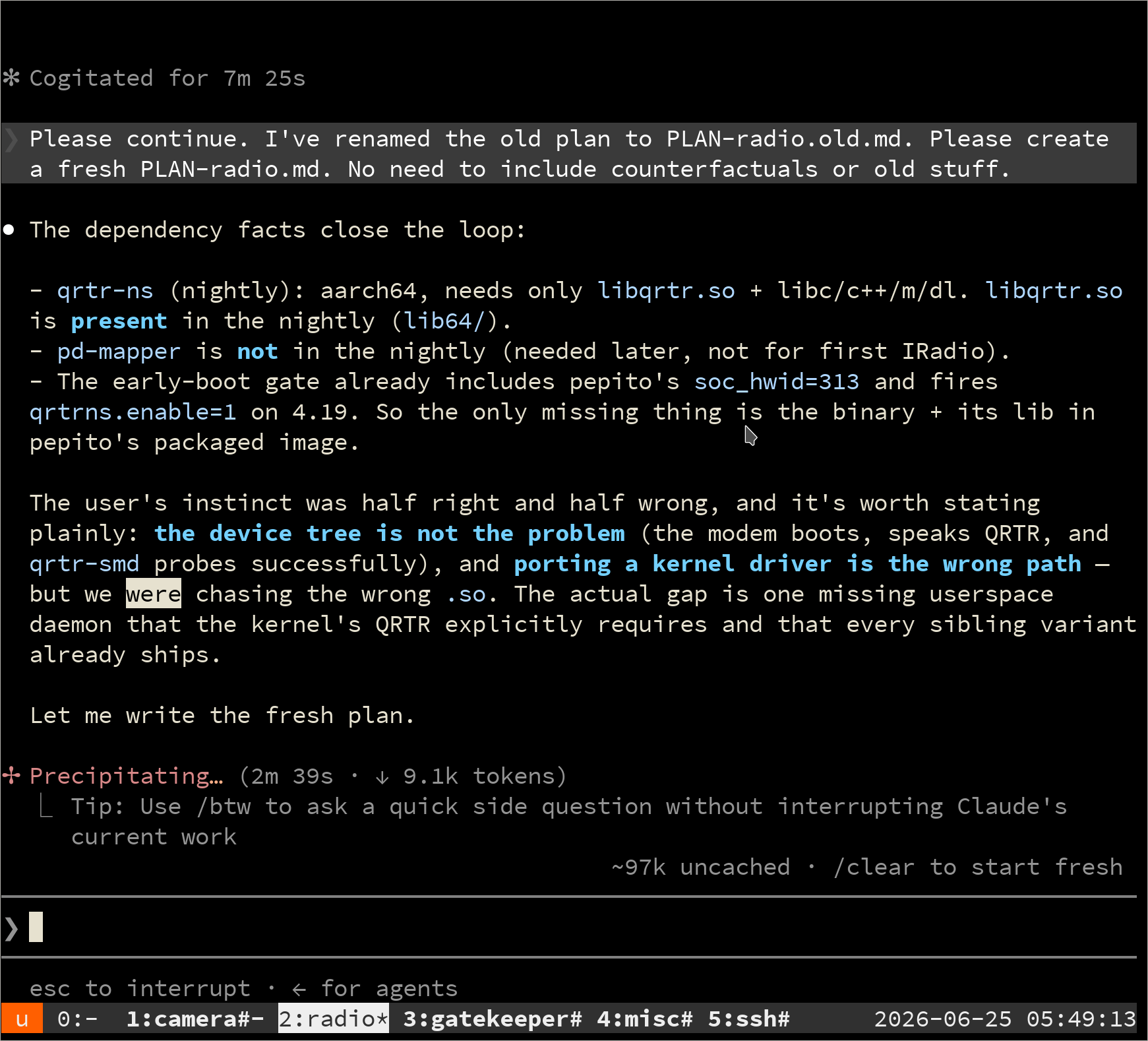
The real problem was a fundamental mismatch in how the two chips talk to each other. Modern Android and our mainline-style 4.19 kernel use a newer on-chip messaging transport called QRTR. This 2017 Palm modem sorta predates that, and expects the older Qualcomm transport called IPC Router, which does a proper handshake (a version negotiation, a capability exchange, a full service-table sync) that QRTR simply doesn’t do. Our kernel had been talking to the modem in a degraded fallback mode the entire time.
I tried really hard to get this modem to speak QRTR, it really looked like I was making progress. It would sorta work but eventually I ran out of ways to debug it.
Rather than keep trying to emulate the old protocol one deviation at a time, I made the call to backport the entire stock IPC-Router stack wholesale out of Palm’s own GPL kernel source: the router itself and the kernel services that ride on it.
It was a hard decision. It was a lot of code to backport, and I wanted to use the modern protocol. The other Xiaomi phones with the same exact chipset and exact same modem firmware appear to use it? Other Linux distros (PostmarketOS) use it.
In the end I made the call, had Claude backport all that kernel code, but it did WORK. On the very next boot the modem came up genuinely healthy on the legacy transport and announced its full set of 36 services, SIM and network and GPS included, for the first time ever.
Telephony (LTE Attach & Mobile Data)
With the modem finally healthy, a fresh problem appeared. The modem was now living on the old transport (IPC Router), but Android’s userspace radio code goes looking for it on the new one (QRTR), where it wasn’t.
There are two ways to bridge that: translate between the two transports, or convince the userspace to use the old one.
It turned out the second option was nearly free.
Qualcomm’s own client library already ships with a complete IPC-Router backend built in; it just picks which transport to use at startup with a single test.
It tries to open a QRTR socket, and if that succeeds it uses QRTR.
On our kernel QRTR exists (the audio DSP needs it), so the library always chose QRTR and never found the modem.
The fix was about ten lines: a tiny shim that makes only that one QRTR-socket probe fail, so the library falls back to its built-in IPC-Router path and reaches the modem directly.
With that in place the SIM read as LOADED, the operator came up as Verizon, and the phone registered on LTE with real cell measurements.
Mobile data was a second, separate problem. Voice and SIM are the “control plane”; actually moving bytes is the “data plane,” and that runs through a dedicated in-kernel path to the modem’s data engine. That path was still trying to reach the modem over QRTR, the same mismatch as before, one layer deeper in the kernel this time. The fix was a surgical revert rather than new code: the 4.19 tree’s own git history still contained the older IPC-Router version of exactly those kernel files, so I brought those back and staged the one userspace data daemon that was missing.
Same deal, Claude is really good at git work and kernel bisecting.
After the big revert, rmnet_data0 picked up an IP address, and ping 8.8.8.8 came back over Verizon LTE with zero packet loss.
VoLTE / IMS Calling
On this network there is no such thing as a plain old circuit-switched call anymore. Voice rides over LTE data as “VoLTE,” managed by a subsystem called IMS, and if IMS won’t register the phone can camp on LTE all day and still never place a call. IMS refused to register, silently, with no error at all: it never even attempted to sign in.
There were two stacked reasons, both on the modem side. The first is a genuine generation gap. This is a 2017 modem, and its IMS service only speaks the original “v01” version of the relevant Qualcomm protocol. The Android 16 radio code I was building on only knows how to send the newer “v02” enable-IMS command, which this modem doesn’t implement, so the instruction to turn IMS on could never actually land.
The fix was two small writes in the old v01 dialect the modem does understand: turn ims_test_mode off, and enable the IMS voice config directly.
IMS registered on its own within seconds, with a real Verizon IMS identity, and both SMS and voice came up as fully in service.
Those settings live in the modem’s persistent storage, so they survive reboots and IMS re-registers by itself on every cold boot. To cover a freshly wiped or refurbished unit, I staged a small boot-time helper that reads those values back and only rewrites them if they’re wrong. Calls now connect both directions and SMS works both directions on Verizon. (Getting actual audio to flow during those calls was its own separate battle, back in the Audio section.)
GPS
GPS was, oddly, one of the earliest things “done” and one of the last things to actually work, for the same reason both times: the modem.
The entire userspace location stack (the config files, the vendor libraries, the gps.prop) was staged and ready early on.
But the GNSS engine on this chip lives inside the modem and advertises itself as just another modem service.
So GPS sat deliberately parked for weeks, explicitly blocked on the modem campaign, and I made a point of not “fixing” a GPS that wasn’t actually broken.
On the stock Palm phone the healthy modem does announce the location service, and stock GPS pulls in live satellites on this exact hardware. Once I fixed the modem, the GPS should start working on its own. That is essentially what happened. Once the modem was healthy on the legacy transport, the location service showed up right alongside the other 36, and with the same force-the-old-transport trick applied to the location service, Android’s GPS provider came alive.
SELinux Enforcing
For almost the entire bring-up the phone ran with SELinux in Permissive mode, where security-policy violations are logged but not actually blocked. That is fine, and even necessary, while everything is on fire and you need to see what would have been denied. It is not fine to ship. A real release has to run Enforcing, where the kernel actively blocks anything the policy doesn’t explicitly allow.
Getting there mostly meant paying down a long tab. Every subsystem in this post had, somewhere along the way, tripped a denial that Permissive quietly waved through, and each of those needed a real policy rule written for it.
This was mostly mechanical work, sifting through Denials and writing .te files.
PVG100 Stuff
I actually missed a lot of features that the original PVG100 phone had.
As a stretch goal, I implemented some cool features that I thought deserved to be in this build:
Face Unlock
The original OS had this feature, a bit ahead of its time. Granted, it was insecure, easily fooled by a photograph.
LineageOS/AOSP don’t even have Face Unlock code at all. They have stubs, but the actual recognition engine is left as an exercise to the vendor.
Well the vendor here is… me.
There is a catch that comes straight from the hardware. This phone has no dedicated face-unlock sensor: no infrared camera, no dot projector, just the ordinary RGB front camera. Android knows a plain camera can be fooled by a photo, so it only ever lets this kind of face unlock reach the weakest “convenience” tier. That means it can dismiss the lock screen, but the phone still insists on your PIN after a reboot, after a timeout, and for anything actually sensitive like payments or the keystore.
AOSP does ship the framework plumbing for face unlock, but the only matcher included is a simulated one meant for testing.
Rather than build a recognition engine from scratch, I ported one that already exists: Paranoid Android’s “Sense” face unlock, which wraps a real RGB recognition engine (Megvii’s, with a basic liveness check) and registers as a proper biometric. I pulled the closed recognition blobs from a Motorola phone that ships them, cloned the Sense app and its framework provider into this build, and wired it into the biometric service so it drives enrollment and authentication through the front camera.
It works! It is faster than the stock Android 8 faceunlock too.
Life Mode
The original OS had “Life Mode” which was another ahead-of-its-time feature.
Essentially Do Not Disturb (DND) with a little bit of power saving (disabled bluetooth and GPS).
I took this a little further, and created a Life Mode shortcut tile that does the following:
- Disables radios (bluetooth, wifi, gps, all optional)
- Does normal DND
- Goes into greyscale (like bedtime mode)
- Enables battery saver (reduces data chatter, disables cpu cores, downclocks the gpu)
The battery in this phone is so tiny. Using Life Mode can greatly extend it.
Pepito Launcher
The feature I missed most was the original PVG100 home screen.
It was pretty unusual, and clearly designed for a 3-inch screen instead of shrunk down from a big one. Rather than pages of labelled icons, it was a single vertical drawer three columns wide, with no text labels at all. The middle column was nudged down by half a cell so the icons interlocked and packed tighter, and while you scrolled a lens effect zoomed the icons near the center of the screen and shrank the ones toward the edges, like the magnify effect on the macOS dock.
Nothing like it ships in LineageOS, and there was nothing to port since the original is a closed 2018 app. So this one is a complete from-scratch reimplementation, not a backport of anything: a small standalone launcher written fresh in Kotlin (PepitoLauncher2 on GitHub).
It ships next to the normal launcher rather than replacing it, so you pick Pepito Launcher in Settings when you want the original experience back.
Custom Recovery
This phone does not have a traditional bootloader (Fastboot). To get into recovery, you have to hold down the only button (Power) for 3 boot cycles, then it will get into the original recovery.
But then, because there are no volume buttons, the only navigation you have is that power button. Short press to cycle, long press to select.
LineageOS’s recovery enables the touch screen, but remember, in the early days of me bringing up this ROM, the touch screen didn’t work!
So I implemented power button navigation in the LineageOS recovery code, so that it functioned just like stock, no need for volume keys.
Power Saving
The battery in this phone is tiny, so late in the project I did a proper low-level pass over the power and performance stack: CPU scheduling, the storage I/O scheduler, GPU clocks, memory compression, and wakelocks.
The quick knobs turned out to already be sensible. The storage scheduler had settled on the modern, responsive one, a first-pass wakelock check showed nothing obviously pinning the CPU awake, and the GPU wasn’t being artificially clamped. The stock Qualcomm tuning this chip family ships with is a reasonable starting point.
The real story only showed up when I stopped eyeballing knobs and actually benchmarked the phone against stock Android 8, measuring power draw right at the battery on identical hardware. My rule was simple: anywhere Android 16 lost to the phone’s own stock firmware, that was a bug I owned. And it lost badly in two places.
At idle with the screen on at full brightness, Android 16 drew about 60% more than stock on the exact same panel. I still haven’t fully root-caused that one; it lives somewhere in the display pipeline, and it is the biggest open item on this list.
Standby was worse, and more interesting. Asleep in a pocket, the phone was burning dozens of times the power stock did, and the culprit was Wi-Fi. While suspended, the Wi-Fi firmware is supposed to filter out the constant background noise every network is full of (multicast, broadcast, stray ARP) and only wake the CPU for traffic actually meant for this phone. Ours wasn’t arming that filter, so every junk packet on the network, every second or two, yanked the whole phone awake. Matching stock’s filter configuration got those spurious wakeups down to zero.
That relentless waking also flushed out a nastier, linked bug. The Bosch sensor hub couldn’t survive being suspended and resumed over and over, and would eventually wedge its internal bus, spin trying to recover, and even block the phone from going back to sleep at all. So one bug, Wi-Fi waking constantly, was quietly triggering a second, the sensor hub falling over under the churn. Both needed real fixes: the suspend filter on the Wi-Fi side, and a proper recovery path in the sensor-hub driver on the other.
On top of those actual fixes, I turned the interesting knobs into opt-in toggles. I added a small “Pepito Tweaks” panel to Settings that exposes a handful of performance-versus-battery tradeoffs you can flip yourself, no root required, all off by default. The one I like most caps the GPU’s top clock speed, trading a little graphics headroom for less drain, and it applies live with no reboot. The rest lean on memory: switching the RAM compressor to a higher-ratio algorithm, a low-memory mode, tighter app heap limits, and a more aggressive low-memory killer, all aimed at keeping this little phone responsive without spending battery it doesn’t have. These pair nicely with Life Mode: Life Mode is the one-tap “settle down” button, while these are the persistent knobs for how the phone behaves the rest of the time.
Android Auto
Android Auto was a hard requirement for this build. It was an original feature for the stock OS, but then Google stopped supporting Android Auto on Android 8.
Out of the box, plugging pepito into a car just threw an “unsupported accessory” error, then the phone got hot and crashed because I left a TODO in the driver that detects USB-C cable orientation. This whole time I had kept my phones on the bench with the screen side up, with the same USB-C cable orientation. This was the first time the phone was out “in the wild”.
I worked through that entire chain and got the whole software side solved. The trickiest parts were preinstalling gearhead (Android Auto codename) correctly (so that a later Play Store update just grafts onto it) and discovering that, contrary to a lot of forum lore, Google Play certification is not actually required!
To test all of this without sitting in the car, I wrote a small tool that makes my laptop impersonate a car head unit over USB, driving the exact handshake a real car would, so I could exercise the phone side on the bench. This is similar to the Android Auto Head Unit emulator you can run on your computer.
After a lot of bug fixing, it works! And importantly, it is stable.
Compass, GPS, Phone calls, BT Audio, voice recognition, music, all the stuff.
Cost
- 3 seats of OpenAI Codex @ $140
- 1 month of Claude Code Pro @ $100
- 1 month of Z.ai GLM 5.2 @ $16.20
- 1 month of a SIM plan for testing telephony @ $10
Total Monetary Cost: ~$260
Total Time: 5 weeks
Tokens burned:
- Z.ai (GLM 5.2): 95.3M
- OpenAI (Codex): not recorded (I canceled the subscription before grabbing the numbers)
- Anthropic (Claude Code): ~41.8M
The Anthropic usage broke down like this:
| Model | Share | Input | Output |
|---|---|---|---|
| Opus 4.8 | 54.9% | 1.3M | 21.7M |
| Fable 5 | 34.5% | 1.6M | 12.8M |
| Sonnet 5 | 6.8% | 259.1K | 2.6M |
| Sonnet 4.6 | 3.7% | 4.9K | 1.5M |
| Total | 3.2M | 38.6M |
A clean cross-provider grand total isn’t possible, since the OpenAI numbers are gone, but the usage I did capture comes to north of 137M tokens.
Not all tokens are the same! I would rather spend $100 on fewer correct output tokens than $10 on incorrect ones.
Retrospective
This was the first time I ever built a custom Android ROM.
I know the PVG100 phone well, I know Linux well, but I didn’t know Android that well.
Additionally this was one of the first times where I used AI, but in a capacity where I was way out of my depth. At work I’m much more in my element, where I’m the expert and I can actually review the work. With Android, SIM stuff, and Telephony, I need to trust the AI a lot more.
Retro: What Went Well
- Having lots of
PLAN*.mdfiles for each individual agent to use was a great way to encapsulate context and work in parallel, yet still allow agents to “peek” at what the other ones are doing and what is in progress - Having 3 phones,
A8,A11,A16-WIPall connected gave the AI a lot of ground truth to work off of, instead of guessing about how it ever worked - Having shell aliases for each of those phones make sure we never made a mistake about which
adbwe were connecting to - Claude Code + Fable was just a beast, knocked the really hard stuff out of the park
- Claude Code Remote Control / Mosh & Tailscale were great ways for me to keep momentum on the project while I was in between changing diapers.
Retro: What Went Poorly
- I wasted money and time on OpenAI Codex with max thinking. For whatever reason, that model wasn’t great at this particular task compared to Opus/Fable.
- GLM 5.2 and local LLMs just didn’t cut it at all, waste of time for this task.
- I had a flaky USB port on my laptop. It seems silly, but it is hard to really trust what is wrong, and spent a lot of time assuming it was the phone’s stack, because it was time-correlated with radio work (but only because I was moving the phone around more with the SIM insertion1)
- Vendor blob extraction mistakes. It is super easy to get vendor blobs wrong. Sometimes I picked one from Palm, sometimes from Xiaomi, sometimes neither was right. Sometimes picking one caused an explosion of transitive deps. I think more Android familiarity would have helped me here, or perhaps this is just part of the work, but it felt like it went poorly.
Conclusion
What a huge project. I learned a ton, and had fun.
I look forward to continuing using this phone as a daily driver for years to come!
Comment via email